|
Key takeaways • Rocket Money's free plan tracks subscriptions and transactions and shows your credit score. • Budgets, net worth and sharing with a partner are Premium features. • Premium is "pay what you think is fair," typically $7 to $14 a month. Premium+ is $15 a month. • If you only want to find and cancel subscriptions, you may not need Premium at all. |
Rocket Money is best known for finding the subscriptions you forgot about. Lots of people sign up for that, then wonder what else the free plan does, and whether Premium is worth it.
This guide lays out what you get for free, what Premium adds, and how its unusual pricing works. Everything here comes from Rocket Money's own pricing page, checked November 2026.
What Rocket Money's free plan includes
The free plan connects to your accounts and gives you a view of where money goes. According to Rocket Money's pricing page, it includes:
• Subscription tracking
• Transaction history
• Net income tracking
• Your credit score
• Its education center
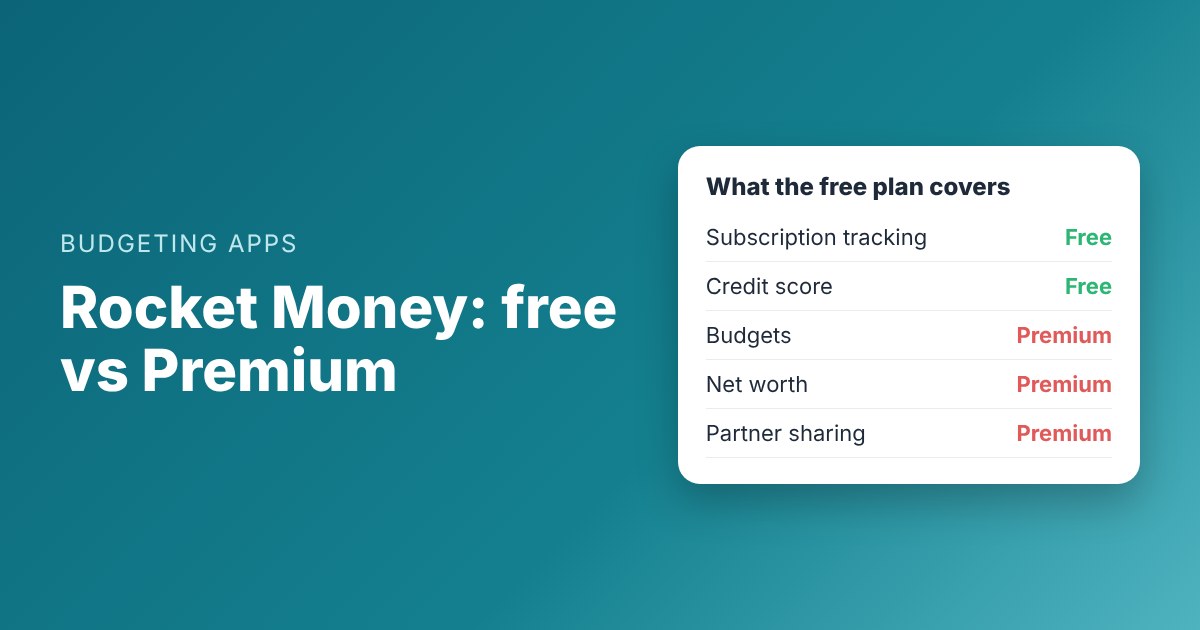
That's a useful set of tools for spotting problems. It's not a budget, though. The pricing page lists total and category budgets as Premium only.
What Premium adds

Rocket Money free vs Premium, from its own pricing page. Checked November 2026.
Premium unlocks the planning side of the app. The main additions are:
• Budgets. Unlimited budgets, overall and by category.
• Cancellations done for you. Rocket Money's team can cancel subscriptions on your behalf.
• Net worth. All your balances and debts in one number.
• Goals and debt paydown tools.
• Partner sharing. Share your account with a partner.
• More control. Transaction rules, splits, export and desktop web access.
• Full credit report, not just the score.
How much Premium costs
Rocket Money uses a "pay what you think is fair" model. You choose your price within a range, which its pricing page says is typically $7 to $14 a month and subject to change.
There's also Premium+, at $15 a month. It adds an AI assistant and includes bill negotiation at no extra cost.
|
Plan |
Price |
What you get |
|
Free |
$0 |
Subscriptions, transactions, net income, credit score |
|
Premium |
Pay what you think is fair, typically $7-$14/mo |
Budgets, net worth, goals, partner sharing, cancellations |
|
Premium+ |
$15/mo |
Premium plus AI assistant and bill negotiation |
From Rocket Money's pricing page, November 2026. Prices can change.
Over a year, Premium works out to roughly $84 to $168, depending on what you choose. Premium+ is $180 a year.
Worked example: Andre's subscription clean-up
Andre signed up for the free plan in October. It found nine recurring charges. Three were things he'd forgotten about: a $12.99 streaming add-on, a $9.99 app subscription from a free trial, and a $14.99 meal-kit plan he'd paused months ago.
|
Subscription |
Monthly cost |
Decision |
|
Streaming add-on |
$12.99 |
Cancel |
|
Photo app (free trial ended) |
$9.99 |
Cancel |
|
Meal kit |
$14.99 |
Cancel |
|
Music |
$10.99 |
Keep |
|
Cloud storage |
$2.99 |
Keep |
Andre cancels $37.97 a month, or $455.64 a year, on the free plan.
Andre cancelled all three himself, which took about 20 minutes. He saved $455.64 a year without paying for Premium.
Then he asked: should he pay for Premium to get budgets? That depends on what he does next.
Who actually needs Premium?
Premium is worth a look if one of these describes you:
• You want a budget inside the same app that already sees your accounts.
• You hate cancelling things yourself and would rather the team do it.
• You and a partner want to share one view of your money.
• You want net worth tracking across all your accounts.
You probably don't need Premium if:
• You mainly wanted to find and cancel subscriptions. The free plan does that.
• You already budget somewhere else and just want a subscription check now and then.
• You're tight on money and the monthly fee would eat into what you're trying to save.
Is Premium worth it? A quick test
Here's a simple way to check. Add up what Premium would cost you for a year, then ask whether it will save or earn you more than that.
|
If you pay |
Cost per year |
Premium needs to save you at least |
|
$7 a month |
$84 |
$84 a year, or $7 a month |
|
$10 a month |
$120 |
$120 a year, or $10 a month |
|
$14 a month |
$168 |
$168 a year, or $14 a month |
|
Premium+ at $15 a month |
$180 |
$180 a year, or $15 a month |
Premium pays for itself only if it changes what you do with your money.
For Andre, the free plan already found his $455.64 a year. Premium's budgets would only be worth it if they helped him save more than the fee on top of that.
Be honest about one more thing: will you open the app? A budget you check once a month won't save much. Pick the setup you'll actually use every week.
Choosing your price
Pay-what-you-want pricing can feel awkward. A few tips:
• Start at the low end of the range. You can always raise it later.
• Put the monthly charge in your budget on its own line, so you see it.
• Set a reminder to review it in three months. If you're not using the budgets, downgrade.
How the free plans compare
|
App |
Free plan includes |
Budgets on the free plan? |
|
Rocket Money |
Subscriptions, transactions, credit score |
No |
|
EveryDollar |
Monthly budget, manual entry, bill due dates |
Yes |
|
Goodbudget |
20 envelopes, 1 account, 2 devices |
Yes |
|
Clear-Budget |
Dated budget, running balance, Safe to spend |
Yes |
Free plans as listed by each company, checked October and November 2026.
So if budgeting is what you want, Rocket Money's free plan is the only one of these four that doesn't include it. Its strength is tracking and subscriptions.
The gap the free plan leaves
Rocket Money's free plan looks backward. It shows what already happened: what you spent and what keeps charging you.
What it doesn't do for free is plan forward. It won't tell you whether rent clears before payday or how much is safe to spend this week. For many people, that's the part that stops overdrafts and late fees.
A free way to fill that gap
One option is to keep Rocket Money's free plan for subscriptions and use a separate free tool to plan ahead. That gives you both halves without a monthly fee.
Clear-Budget is built for the planning half. You list your paychecks and bills with their due dates, and it shows a running balance after each one, plus the day your balance will be lowest. It's free, and it never asks for your bank login.
Andre now uses Rocket Money's free plan once a month to check for new subscriptions. He plans each paycheck in Clear-Budget, including the two subscriptions he kept, so they never surprise him.
How to decide in five minutes
1. Write down why you signed up for Rocket Money.
2. If it was subscriptions, use the free plan for a month and see if that's enough.
3. If you also want a budget, decide whether you want it inside Rocket Money (Premium) or in a separate free tool.
4. If you pick Premium, choose a price you're comfortable paying every month for at least a year.
5. Put the cost in your budget either way, so it doesn't become the next forgotten subscription.
For a step-by-step subscription check you can do in an evening, see how to find and cancel forgotten subscriptions. And if you're comparing other apps too, our roundup of free Mint alternatives covers Rocket Money next to EveryDollar, Goodbudget and Clear-Budget.
Ready to plan the next paycheck? Create a free Clear-Budget account.
FAQ
Is Rocket Money free?
Yes, there's a free plan. It covers subscription tracking, transaction history, net income tracking and your credit score. Budgets and other planning tools are part of Premium.
How much is Rocket Money Premium?
You choose what to pay. Rocket Money's pricing page says it's typically $7 to $14 a month. Premium+ is $15 a month.
Can I budget with Rocket Money for free?
Not according to its current pricing page, which lists total and category budgets as Premium only.
Does the free plan cancel subscriptions for me?
It shows you your subscriptions so you can cancel them. Having Rocket Money's team cancel them for you is a Premium feature.
This article is for general information only and is not financial advice.