|
Key takeaways • Check bank and card statements, app store accounts and your email to find every subscription. • Turn every price into a yearly cost before you decide. • Keep a subscription only if you used it last month, would sign up again today and can't easily replace it. • Cancel today, not "before the renewal". Put trial end dates in your budget. • Give subscriptions their own line in your budget so new ones can't hide. |
Subscriptions are designed to be easy to start and easy to forget. One free trial, one "just this month", one app you used twice. A year later, they're still charging you.
None of them feel expensive on their own. That's the whole point. But together they can quietly cost as much as a utility bill.
This guide walks through a simple subscription check-up. It takes about 30 minutes, and you only have to do the full version once a year.
Step 1: Find every subscription
You can't cancel what you can't see. Look in these four places, because subscriptions hide in different spots.
Your bank and card statements
Go through the last three months of every checking account and credit card. Three months matters because some charges come every other month or every quarter. Look for the same name showing up more than once, and for small amounts you don't recognize.
Our guide on how to track your spending has easy ways to go through a statement quickly.
Your phone's app store
Subscriptions bought through apps are billed by Apple or Google, so the charge may just say "Apple" or "Google" on your statement. To see them all:
• iPhone: open Settings, tap your name, then Subscriptions.
• Android: open the Google Play Store, tap your profile picture, then Payments and subscriptions, then Subscriptions.
Your email
Search your inbox for words like "receipt", "renewal", "subscription", "trial" and "your plan". This is the best way to find yearly subscriptions, which won't show up in three months of statements.
Shared and family plans
Check whether you're paying for a plan someone else uses, or whether someone already pays for one you have too. Couples and roommates often double up on the same service.
Step 2: Make one list with yearly costs
Write every subscription on one list with its price and how often it charges. Then add a column for the yearly cost. A $9.99 monthly charge looks small. Written as $119.88 a year, it gets a more honest look.
Here is Priya's list. She found nine subscriptions. She had guessed she had four.
|
Subscription |
Monthly |
Yearly |
Decision |
|
Video streaming A |
$17.99 |
$215.88 |
Keep |
|
Music streaming |
$11.99 |
$143.88 |
Keep |
|
Cloud photo storage |
$2.99 |
$35.88 |
Keep |
|
Gym membership |
$39.00 |
$468.00 |
Cancel |
|
News site (promo ended) |
$16.00 |
$192.00 |
Cancel |
|
Video streaming B |
$9.99 |
$119.88 |
Cancel |
|
Delivery membership |
$9.99 |
$119.88 |
Cancel |
|
Workout app ($79.99 a year) |
$6.67 |
$79.99 |
Cancel |
|
Game subscription |
$4.99 |
$59.88 |
Cancel |
|
Total |
$119.61 |
$1,435.27 |
|
Step 3: Decide with three questions
Don't cancel everything. Some subscriptions are worth it. For each one, ask:
1. Did I use it last month? Not "might I use it". Did you actually use it?
2. Would I sign up again today, at this price? If the answer is no, the only reason you're paying is that you already were.
3. Can I get the same thing free or cheaper? Your library, a free tier, a family plan, or something you already pay for.
If it fails any of the three, cancel it. If it passes all three, keep it with no guilt.

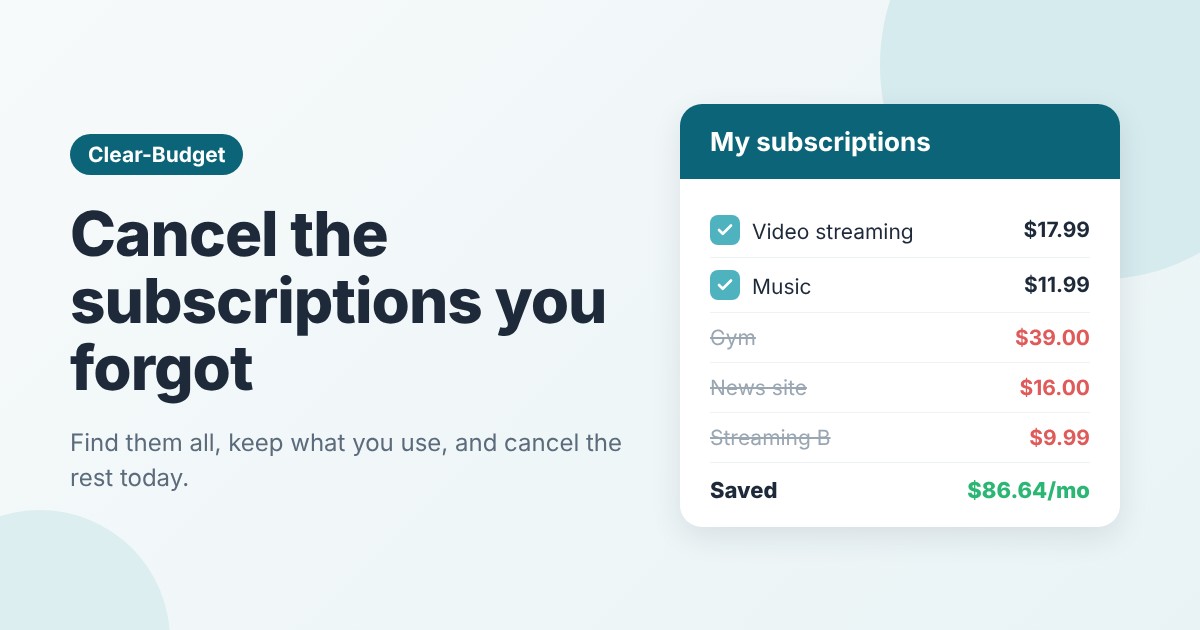
Priya kept three subscriptions and cancelled six. That's $86.64 a month back in her budget.
Priya kept her main streaming service, her music and her photo storage. She used them every week. She cancelled the gym she hadn't visited since summer, a second streaming service she'd signed up for to watch one show, and a news site whose promo price had quietly doubled.
Her monthly subscriptions went from $119.61 to $32.97. That's $86.64 a month, or about $1,040 a year.
Step 4: Cancel the right way
Cancelling takes a few minutes, but a few habits make sure it sticks.
• Cancel today. "I'll cancel before it renews" is how most forgotten subscriptions happen. Most services let you keep using it until the end of the period you paid for.
• Cancel where you signed up. If you subscribed through an app store, cancel there. Deleting the app does not cancel the subscription.
• Save the confirmation. Take a screenshot or keep the email, in case you're charged again.
• Check next month's statement. Make sure the charge really stopped.
If a company makes it hard to cancel, call and say clearly that you want to cancel, not pause. If you're charged after cancelling, ask the company for a refund first, and if that fails, ask your card company about disputing the charge.
Try rotating instead of stacking
If you like several streaming services, you don't need all of them at once. Keep one, finish what you want to watch, then switch. You'll often pay for one or two at a time instead of four.
Step 5: Stop free trials from catching you
Free trials turn into paid plans on purpose. Here's how to use them without paying by accident:
• On the day you start a trial, add the end date to your budget or calendar, with the price it will charge.
• Many services let you cancel right away and still keep the trial until it ends. If yours does, cancel on day one.
• If a trial needs a card, ask yourself whether you'd pay the full price. If not, skip it.
Step 6: Give subscriptions a line in your budget
The check-up works. But new subscriptions creep back in. The fix is to treat subscriptions as a real budget category, with a number.
Priya gives herself $35 a month for subscriptions. If she wants a new one, something else on the list has to go. That one rule keeps her total from slowly growing again.
Yearly subscriptions need special care. Divide the yearly price by 12 and set that aside every month, so the renewal doesn't land as a surprise. Our guide to sinking funds explains how. Subscriptions are a classic example of fixed vs variable expenses being blurrier than they look.
Where to put the money you saved
Money you free up has a way of disappearing into everyday spending. Give it a job the same day you cancel. For example:
• Add it to your emergency fund.
• Put it toward a debt.
• Use it for something you've been saving up for.
Priya moved her $86 a month to her credit card balance. That's money she was spending on things she didn't use, now working for her.
How Clear-Budget can help
In Clear-Budget, add each subscription you keep as a repeating item with its charge date. It shows up in every budget with the right amount on the right day, so it's never a surprise. Bill reminders can let you know the day before something renews, which is a good moment to ask "do I still use this?"
It's free, it works on your phone and the web, and you never have to link your bank.
FAQ
How often should I check my subscriptions?
Do a full check once a year, and a quick look at your statement every month. The monthly look only takes a few minutes once your list is set up.
Is it better to pay yearly or monthly?
Yearly plans are often cheaper, but only if you'll use the service all year. If you're not sure, pay monthly for a few months first, then switch.
Does deleting an app cancel the subscription?
No. You need to cancel the subscription itself, in the app store or on the company's website.
What if I don't recognize a charge?
Search the name online first, since billing names often differ from brand names. If you still can't place it, call your card company. It could be fraud.
This article is for general information only and is not financial advice.